Azure Communication Services配額提高申請步驟
Azure Communication Services的節流層級(Throttling Tier)預設是default等級,若想增加更多的MailFrom addresses的數量,就必須提高節流層級,需要額外申請。
申請前需要從自訂網域發送至少 30 封測試郵件,且郵件失敗率需低於 2%。完成後,再請回覆問卷中的所有問題(所有問題都需要提供答案)
Customer Information
• Company name:
• Company website:
• Provide a brief description of your business:
Email Service Information
• Subscription ID:
• Azure Communication Services Resource Name:
• Is your custom domain already set up and currently used for sending messages:
• Indicate the domain from which you are currently sending emails:
Usage Information
• What type of emails do you send? (such as Transactional, Marketing, Promotional)
• Specify the expected volume of emails you plan to send:
– What is the maximum rate of messages per minute that you require? (specific numbers)
– What is the maximum rate of messages per hour that you require? (specific numbers)
– What is the maximum rate of messages per day that you require? (specific numbers)
Additional Information
• What is the source of the email addresses that you use for sending your messages?
(e.g., donotreply@xxx.com, notification@xxx.com)
Note: The source of the email addresses that you send your messages to plays a crucial
role in the effectiveness and compliance of your email marketing campaigns. Providing
details about the source of your email addresses helps us understand how you acquire
and maintain your subscriber list.
• How do you currently manage and remove email addresses that have unsubscribed or resulted in bounce backs from your mailing list?
Explain if you have an automated process in place that handles unsubscribes when
recipients click on the ‘unsubscribe’ link in your emails. Additionally, if you
receive bounce/undeliverable notifications, can you include how you handle those and
whether you have any mechanism to automatically remove email addresses that result in
consistent bounces.
只有在失敗率穩定低於 2% 的情況下,微軟才會進一步提高電子郵件配額上限。
如何查看目前寄送失敗率?
一、先確認哪些 Email 日誌已送到 Log Analytics
在 Azure Communication Services (ACS) 資源 → 監視 (Monitor) → 診斷設定 (Diagnostic settings),務必勾選並送到 Log Analytics 工作區的三個 Email 類別:
- Email Service Send Mail logs(ACSEmailSendMailOperational)
- Email Service Delivery Status Update Logs(ACSEmailStatusUpdateOperational)
- Email Service User Engagement Logs(ACSEmailUserEngagementOperational)
電子郵件記錄 – An Azure Communication Services article | Microsoft Learn
二、從UI介面查看時間內的寄送成功率
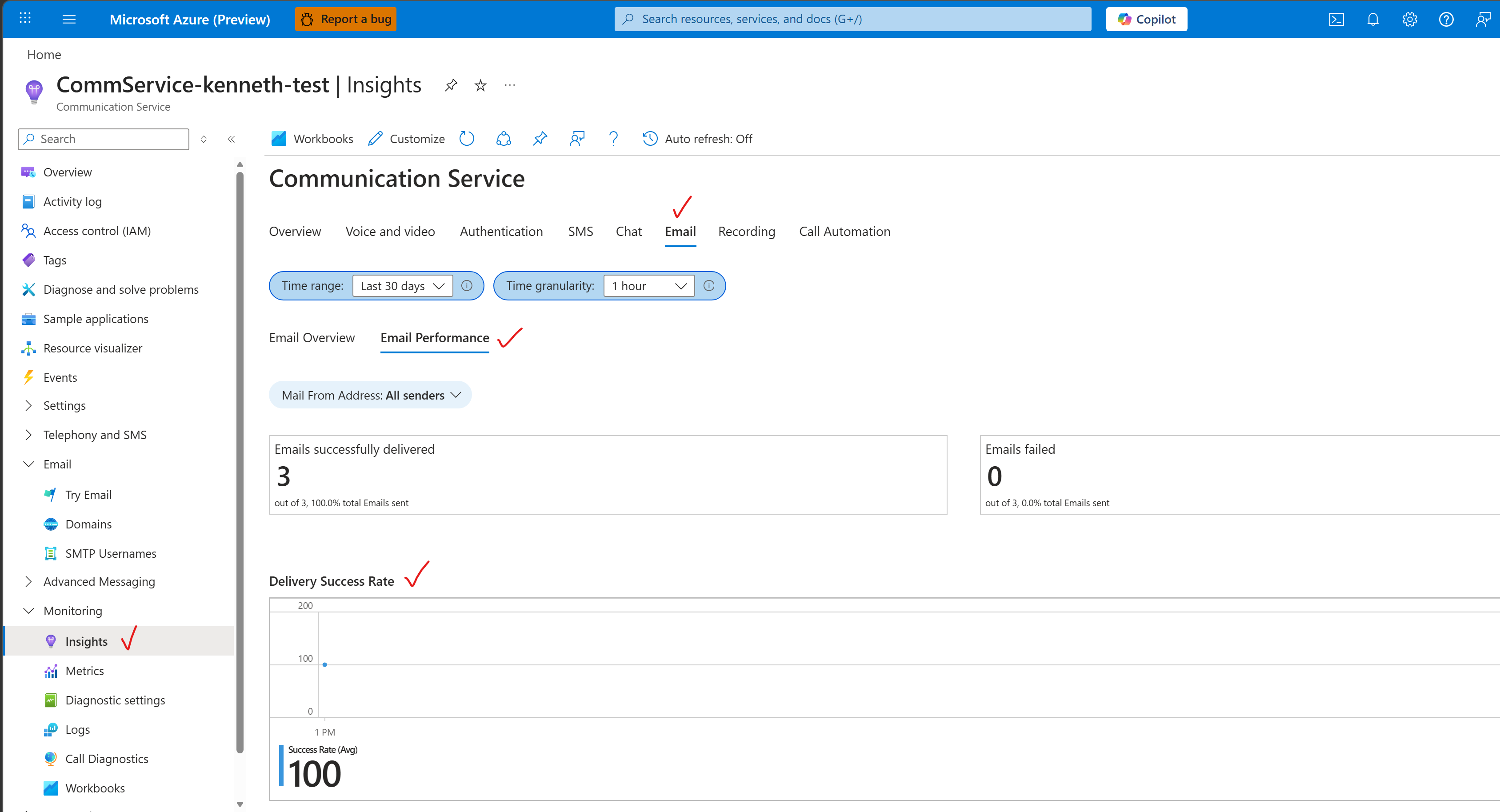
- 前往 Azure Portal
- 開啟對應的 Azure Communication Services(ACS)資源
- 點選左側的 Monitoring
- 切換到 Insights 分頁,選擇 Email Performance 即可看到整體的失敗百分比概覽


近期留言